

 ARTS & SCIENCES COMPUTING
System Requirements
Respondus recommends the following minimum system requirements for using Lockdown Browser:
- Mac/Windows laptops with 16 GB RAM. This will enable the laptop to have the 2-4 GB free RAM necessary to allow Lockdown Browser to run without the issues found in systems that have less RAM.
If your laptop does not meet these minimum requirements, please use a bluebook for your exam. However, if your laptop worked with a previous Lockdown Browser exam, you may continue to use it for future exams.
PLEASE NOTE: Some users have reported success using iPads with Respondus while others have encountered issues. We do not recommend using iPads with Respondus.
Locating Lockdown Browser
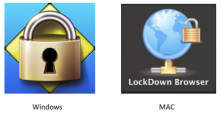
If Lockdown Browser doesn't appear on your Windows Desktop or Mac Dock, you can search for Lockdown Browser on your computer. The Lockdown Browser icon looks like this:
Exams enabled for Respondus are designed to work with Lockdown Browser only. Firefox, Safari, Chrome, or any other browser will not work with exams enabled for Respondus.
The newest version of Lockdown Browser is available via the link under "What Students Need to Do" here.
"Restarting Your Computer"
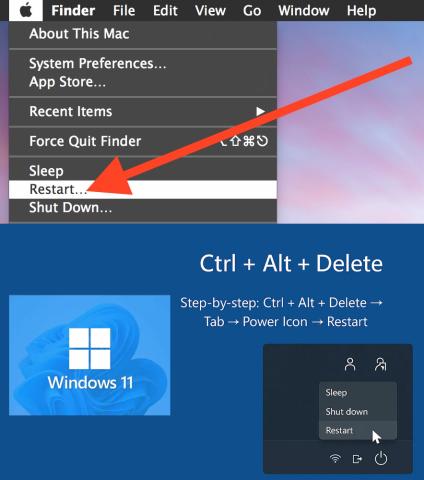
If you have issues with Lockdown Browser, please try restarting your computer. On Macs, go to the Apple menu and select "Restart." You may be asked to save files that are open in the various applications that are open. On Windows, there are multiple ways to restart: Start menu, Ctrl + Alt + Delete, or keyboard shortcuts like Alt + F4. The most common method is to click the Start button, select the power icon, and then choose "Restart."
You must close all applications on your laptop before Lockdown Browser will run!
If you are still experiencing issues running Lockdown Browser, you will need to complete your exam using a bluebook.
More Troubleshooting Tips
- New Quizzes Exams - Students may notice that a New Quizzes exam allows a normal browser (Firefox, Safari, Chrome, etc) to open the exam which then triggers Respondus Lockdown Browser to open. Even if this is the case, we do not recommend accessing any Respondus-enabled exam this way. Students should restart their computer, run Lockdown Browser, login to Canvas, and then access the exam via Lockdown Browser. This is the surest way to obtain the best and consistent results no matter what kind of exam (New Quiz or Classic Quiz) they will encounter.
- No Shortcuts! - Students should access their exams through the Quizzes link on the lefthand side panel rather than use any shortcuts from their summary page.
- Reboot! - Most Lockdown Browser issues can be resolved with a restart. This clears the system memory of errant apps that refuse to close.
- Lockdown Browser Error Messages - Students who see an error message when they run Lockdown Browser should restart their computer and try running Lockdown Browser again.
- Screensavers - If a student's computer has an automatic screensaver function, please have them disable it before they start Lockdown Browser. If the screensaver comes on while they are in Lockdown Browser, it may halt the proper functioning of Lockdown Browser and they will need to restart their computer.
- Lockdown Browser Freezes - We recommend that students do not close their computer during an exam. Doing so might cause Lockdown Browser to freeze or display an error message and may require them to restart their computer, run Lockdown Browser, and login to Canvas again. Do not worry. All work is autosaved. If a student needs to use the restroom, please have the student keep their computer open and cover their screen.
- Bluebooks - If a student has trouble with Lockdown Browser and restarting their computer doesn't help, they will need to ask their teacher or proctor for a paper test.
- Submitting Exams - Students should not submit their test until they are sure that they are completely finished. Once submitted, they will not be able to re-open the test. If they do not submit their exam, it will not be gradeable.